|

|
FILE SPECIFICATIONS
|
| |
|
|
 |
Name: |
Contact Manager |
| Filename: |
CMV43EMB.EXE |
| File Size: |
8.0 Megabytes |
| Version: |
4.3 |
| Author: |
Cedesta Systems |
| Release Date: |
January 31st, 2015 |
| Certified? |
 |
| Cost: |
FREE |
|
|
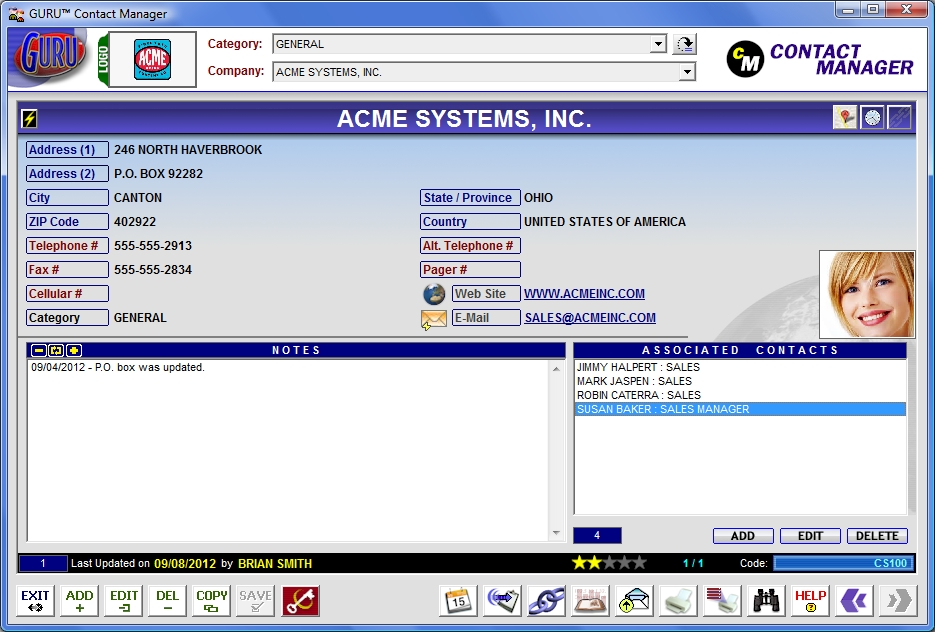
Prepare yourself for one of the easiest
and most powerful contact management systems available today. Successfully manage companies, contacts, phone numbers,
web and e-mail addresses, and other related information.
Includes the following
features:
· Built-in
call timer with automatic recording.
· Ability to create associations between one or more companies.
· External mapping capability.
· Logo and contact image support.
· Active links to web and e-mail addresses.
· Company ratings.
· Built-in Report editor.
· Export to Excel and CSV capabilities.
· Custom Attributes.
 Click here to view full-screen image. Click here to view full-screen image.


DOWNLOADING INSTRUCTIONS:
The file that you
will download is called CMV43EMB.EXE. This is your setup program.
INSTALLATION INSTRUCTIONS:
· Once you
have downloaded the setup program, run it and follow the installation instructions.
· The installation program will install the system files, including the .GAM file required to add to your
console.
· From the GURU console, click on SYSTEM, and then INSTALL ADD-IN. A new dialog box will appear.
· Click on BROWSE and select the IDENTIFY.GAM file that you just downloaded and then click on OK.
· A confirmation message should now appear stating the add-in was successfully installed. Click OK to close.
· From the console, click on APPLICATIONS. You should now see the new add-in you just installed.
· Just double-click on the CONTACT MANAGER add-in to start!
 |